


Game editing isn't limited to trickshot and fragmovie content. It typically gets perceived as something entirely game related, but it can also be an expressive medium with little weight held on the game itself. I'm interested in trying to make entry a little bit less stigmatized or intimidating!
It makes for an incredibly versatile medium, since the base layer of the subject matter is taken care of- you can focus on other elements like expression/cinematography/vfx/sound design. This also allows insanely expressive content to be created in very little time. So much so that there was an entire sect of the PC editing scene that hosted and participated in 1-3 hour contests (HCs)
Most games you'll be able to work efficiently in tend to be older source + COD games, and it's easier than it might seem from the outside! You don't even need to hit your own clips.
I'm going to use Black Ops II as the base of this guide, since the community provided tools are the most friendly to newcomers.
-------------------------------------------------------------------------------
-------------------------------------------------------------------------------
Now that your directory is set-
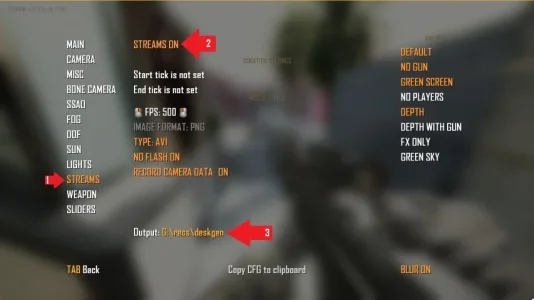
Small frame drops don't seem like an issue for single pass recording- but streams allows AOV passes to be recorded alongside the game, all at once, just like a 3D Render. This means having seperate world/greenscreen/depth passes- which opens the door to a lot of possibilities in your editing software. Not necessary though, plenty of people only work with the base pass!
NOTE ABOUT STREAMS: as of writing this- starting a streams recording will turn off both dof_enable and r_bloomtweaks. If you need DOF on or bloom off, you'll need to use an external recording software. If you have the ability and willpower to contribute and submit a fix, please do.
T6MVM adds the ability to keyframe rotation and fov of the dolly cam, as well as a built in camera shake- all extremely useful tools for a much more versatile shot
However it's been completely missing in newer games!! Doing things with a controller is just too much work, and provides subpar results.. even SKATE. added this feature, but it's yet to be seen in a shooter game since BO3... Personally I really do wish they'd add something in newer titles, the PC editing community is losing a lot of steam due to the same few games being the go-to medium for >10 years
3D tools exist, and people usually bring this up in regards to this issue, but it ignores that accessibility of creation is a HUGE thing. 3D is more intimidating than just doing it in the game itself.
Enough opinions, moving on-
-
EXTRA RESOURCES:
Amyst's T6MVM Tutorial
Amyst's "BO2 Stuff" Playlist, full of resources regarding recording
T3C, a community channel that's been running for nearly 15 years
It makes for an incredibly versatile medium, since the base layer of the subject matter is taken care of- you can focus on other elements like expression/cinematography/vfx/sound design. This also allows insanely expressive content to be created in very little time. So much so that there was an entire sect of the PC editing scene that hosted and participated in 1-3 hour contests (HCs)
Most games you'll be able to work efficiently in tend to be older source + COD games, and it's easier than it might seem from the outside! You don't even need to hit your own clips.
I'm going to use Black Ops II as the base of this guide, since the community provided tools are the most friendly to newcomers.
-------------------------------------------------------------------------------
RESOURCES NEEDED:
- BO2 Multiplayer (+DLCs, optionally) sourced however you like. Steam or otherwise.
- Redacted LAN Client (with zone folder cleared)
- T6MVM by Amyst
- 201 Legendary demos (replay files, distributed by Koriqzia)
-------------------------------------------------------------------------------
INSTALL THE TOOLS:
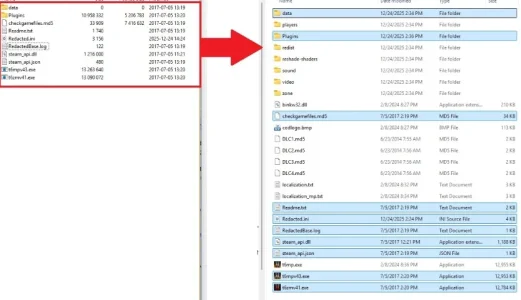
- Extract [Redacted_LAN (guns removed).7z] contents into your Black Ops II directory:
- If you've sourced [Redacted_LAN.7z] from elsewhere, delete or rename zone > redacted.ff
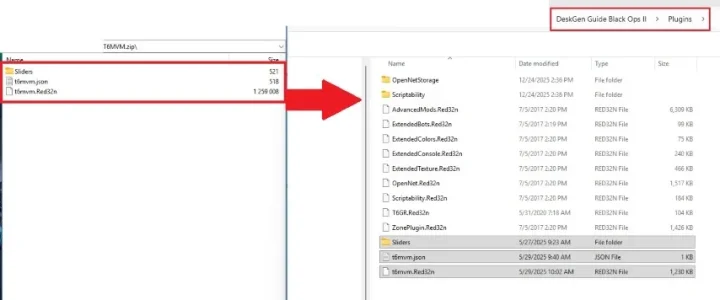
- Extract [T6MVM.zip] contents into Black Ops II > Plugins directory:
- Extract [201 Legendary BO2 Frags Redacted Demos.rar] into any directory you like.
- These are demos hit by known fraggers ~7-10 years ago. If you wish, you can hit your own clips on bots and find the demos in Black Ops II\Plugins\OpenNetStorage\Cloud\FILM_MP
You're now finished with prep.
You may have to remove/rename extension of Black ops II > Plugins > t6mvm.Red32n in order to hit your own clips in private match. Re-enable it when you're ready to record.
-------------------------------------------------------------------------------LOADING A DEMO AND RECORDING YOUR FIRST CLIP
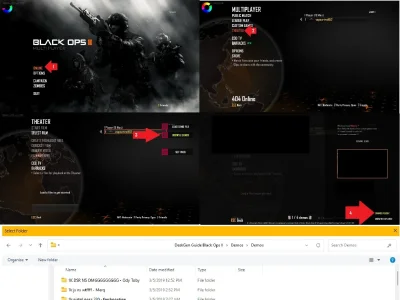
Starting from the main menu,- go to ONLINE > THEATER
- on the right hand side, you'll see BROWSE DEMOS. Click this, then hit CHANGE FOLDER in the bottom right.
- Set the folder to the directory where you've extracted [201 Legendary BO2 Frags Redacted Demos.rar]
Now that your directory is set-
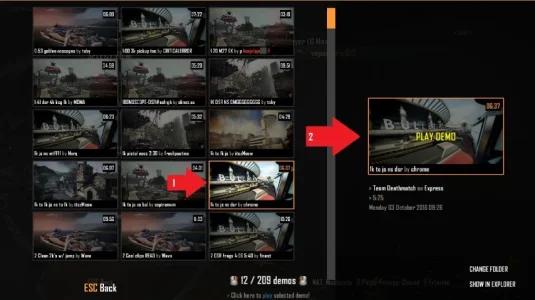
- Choose a demo on the lefthand side of the BROWSE DEMOS panel
- Hit PLAY DEMO on the right side
The description of the demo will contain the timestamp in most cases.
Once your demo is loaded, you can use the up/down arrow keys to speed and slow the demo.
you can adjust the step the timescale adjusts by hitting tilde (~) and using the command mvm_demoTimescaleStep. Alternatively you can just use the timescale command.
You've found your frag- what's next?
Creating a CFG
- Hit tab to open the T6MVM UI
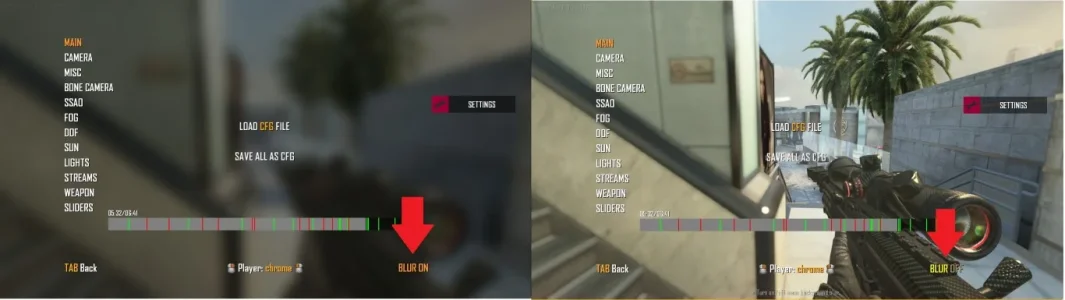
This panel will allow you to change DVARs relating to visual elements of the game. For visibility over what you're doing, toggle the BLUR button to OFF in the bottom right
- Explore each tab and tweak as you like!
RECORDING
Using external recording software IS NOT necessary! It's still an option if you'd like, but it runs the risk of small frame drops- which using the "streams" functionality built into T6MVM mitigates.Small frame drops don't seem like an issue for single pass recording- but streams allows AOV passes to be recorded alongside the game, all at once, just like a 3D Render. This means having seperate world/greenscreen/depth passes- which opens the door to a lot of possibilities in your editing software. Not necessary though, plenty of people only work with the base pass!
NOTE ABOUT STREAMS: as of writing this- starting a streams recording will turn off both dof_enable and r_bloomtweaks. If you need DOF on or bloom off, you'll need to use an external recording software. If you have the ability and willpower to contribute and submit a fix, please do.
Choose your streams settings
- Go to the Streams tab in the T6MVM UI
- Set STREAMS to ON
- Choose your settings + passes + output directory
I recommend setting both a start and end point to the recording. These recordings can get pretty huge, so it's best to make sure you don't overshoot the recording too much.
FPS > 500 is recommended. Editing games typically will involve working with the speed in ways that can dip to 10% or lower. Higher FPS is better in our case.
When using AVI or PNG output, be ready to have ~50GB per clip allocated. You can compress them later using FFMPEG
If you do NOT have enough storage- use the JPG output
enabling "RECORD CAMERA DATA" will output a .t6cr file, which can import into After Effects using this tool by eirisocherry
- Hit tab to exit T6MVM UI
- Press F5 to start recording your clip
Hitting F5 again will stop the recording, hitting F6 will stop the recording and delete the files - in the case you've made a mistake and want to erase the current recording
Using the dolly camera to make cinematics
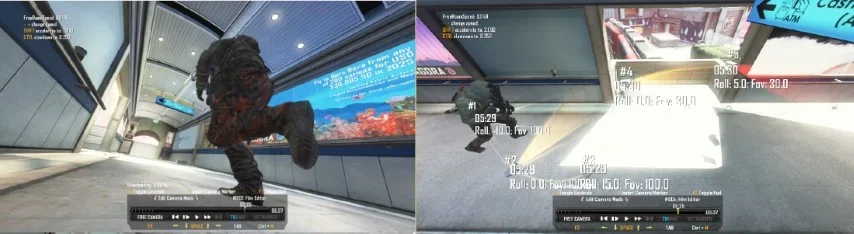
BO2 ships with a dolly cam in it's base theater mode, allowing the user to create keyframed, interpolated campaths exactly like you would in a 3D software.T6MVM adds the ability to keyframe rotation and fov of the dolly cam, as well as a built in camera shake- all extremely useful tools for a much more versatile shot
However it's been completely missing in newer games!! Doing things with a controller is just too much work, and provides subpar results.. even SKATE. added this feature, but it's yet to be seen in a shooter game since BO3... Personally I really do wish they'd add something in newer titles, the PC editing community is losing a lot of steam due to the same few games being the go-to medium for >10 years
3D tools exist, and people usually bring this up in regards to this issue, but it ignores that accessibility of creation is a HUGE thing. 3D is more intimidating than just doing it in the game itself.
Enough opinions, moving on-
- Press F3 twice to cycle to Edit Camera Mode
- Adjust your camera's movement speed using + or -, pick something you can use to get precise angles you like
- Use Scroll to rotate the camera, and ctrl + scroll to change zoom
- Once at an angle you like, hit F to place the first keyframe
- Hit play, I prefer in small increments, and continue placing your points until you have your finished shot.
- Use the timeline to navigate to the beginning of your campath
- Left click to swap from Edit Camera Mode to Dolly Camera
- Record as you did your clip
- Repeat for each shot you'd like
And that's it! You have your recs. I'll cover the basics of editing this sort of footage in Vol. 2
-EXTRA RESOURCES:
Amyst's T6MVM Tutorial
Amyst's "BO2 Stuff" Playlist, full of resources regarding recording
T3C, a community channel that's been running for nearly 15 years


